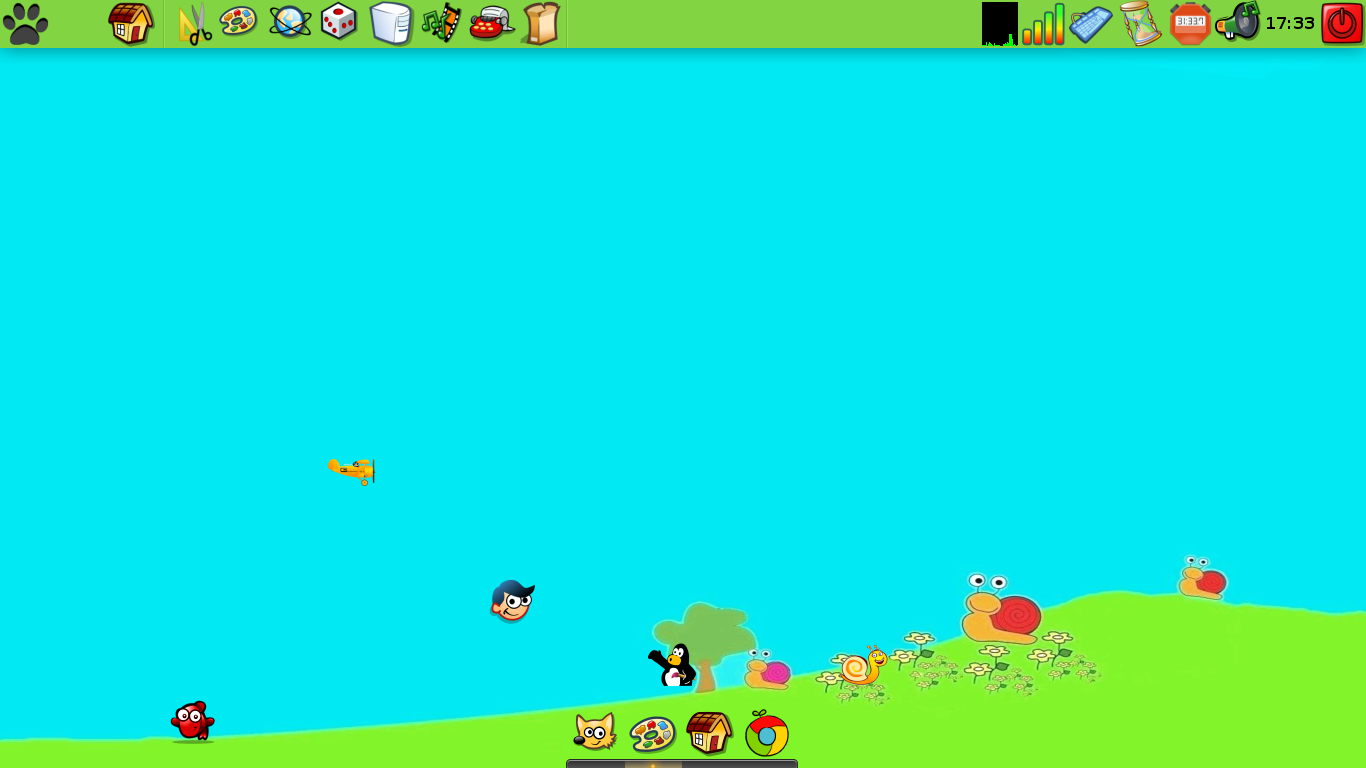
This weekend, I'll be testing antiX-13, which has released its first beta!
Needless to say, this release is intended for testing purposes, and it is available for 32 bit and for 64 bit computers in two separate .iso files of around 370 MB.
With about 550 Mb of base memory, it took me 15 seconds to go from Grub to antiX desktop. Not bad!!
As it can be seen, antiX-13 takes 10% of that RAM when idle. Launching Iceweasel and the game Connectagram takes 27%.
Also, it is important to notice that these isos are of antiX base, which means you won't find lots of applications stuffed into the live CD. These are for people who want a usable, basic system with some software included, but who would like to add their own packages later. In fact, if you check the "Office" category, you'll see just a phone notebook and Ted rtf text processor. That's it.
What if you want to add GIMP or LibreOffice? And what if you prefer another desktop environment?
antiX makes it easier for you with its metapackage-installer. You'll find it if you go to "applications" and then to "accessories":
As you can see, using the metapackage-installer, you can download and install different kinds of software to your liking.
Another important detail is that antiX repo has several kernels available:
3.6.11 (the kernel antiX-13 uses) 3.6.11-gnu 3.7.5 3.7.5-gnu
I have to test this release a bit further. I installed antiX M11 into a Toshiba Mini NB515 and its owner just loves it.
I don't know why, but my thoughts have been going back to the past lately. Is it Jetpack and Digger's fault? :P
Anyway, today it is the turn of MS Windows. I grew up in a MS-DOS world and my first contact with Windows was 3.11. Then, I used 95, ME (my all time favorite in spite of its terrible fame), and XP. A bit after Vista was launched, I became a full-time Linux user. I've used Vista and Vista/7 a couple of times on other people's computers, mostly to prepare the HD to host Linux, though.
With the imminent success of Windows 8 (according to Microsoft), I started to reflect a bit on the evolution of Redmond's OS.
I must agree there is an awkward similarity. Still, some users challenged the original poster, saying "Did AOL have live tiles then?"
Then, other users counter-attacked with a pretty lethal dose of sarcasm, saying: "Yeah, because live tiles are such a big step forward from gadgets!"
Leaving all that aside, there are other similar elements of Windows 8 and earlier Windows versions. To start, even their logos are suspiciously alike:
The logo of Windows 1, back in 1985
Windows 8 Logo, 2012
Now, beyond logo design, the points in common that Windows 8 shares with its predecessors were also seen as show stoppers and mistakes in their times. Let's see:
Windows 1(1985): Because of disputes with Apple, instead of overlapping windows, users had to deal with TILES!
Windows (2012): Metro brings tiles back, only that this time the "modern" interface offers live tiles. Do they actually help productivity?
Windows 2 (1987): Tiles begin to be replaced by overlapping windows, but the taskbar is gone. As a bonus, the background color was an eye-killer in all sense.
Windows 3 (1990): The lack of a taskbar made working with several maximized programs quite messy, but the background color improved and the overlapping windows got better.
Windows 95 (1995): The taskbar was back! It solved the annoyances of its predecessors and improved performance and productivity and stayed until 2012...
Summing up, Windows 8 resembles Windows 2: No taskbar, no overlapping windows but tiles instead...
I've heard of some Windows 8 users who don't like the background of the OS, so they have replaced it with...a solid gray color! (YES! Let's bring the style of Windows 3 back!)
Now, I won't go over the atrocious touch interface for desktops. That's ergonomically disastrous. Even if Windows lovers feel that's cool, your arms will feel otherwise, for sure.
Beyond all the hype around it...are we sure Windows 8 represents an evolution of Redmond's OS? It looks more like a nostalgic OS release to me, quite like those "Best Songs of" albums...only that the features Windows 8 has in common with older Windows releases don't seem "the best" now and they were not the best in the past, either.
Back in 1983, Windmill Software published a little game that became a legend: Digger!
Well, the game actually looked like this:
I don't know in what specific date Digger came to life, but I'm very happy that even today it is still remembered. In fact, this little old game has an official page, from which you can download Digger along with other classics, such as Styx.
Ah, the good ol' Digger was remastered and ported to several platforms, including some Linux versions! I could download the Debian version from that page!
I'm also glad that the game was ported to Android. You can download Digger HD!
The answer is simple: an active community that raises PARDUS ANKA from its ashes!
The Pardus ANKA community is making good progress with their fork of Pardus. According to Pardus Life, the Anka community has already translated their site into English. There, you can see what is happening with this distro. Right now, they are promoting Anka by means of banners.
According to Pardus Life, the official Pardus, now based on Debian, is advancing, too. Their RC2 is very stable.
For those who wanted to burn Pardus: now you have two big cats taking shape that will hunt you!
If you have kids, are involved in children's education, or somehow are curious about computing environments that offer kids opportunities for learning and leisure, then you should take a look at PicarOS.
PicarOS is a MiniNo GNU/Linux system that, while being fully packed with lots of applications, is easy on your computer's resources. Since it is based on MiniNo Ártabros 2.0, it is able to run on systems with 1.0 GHz processors and 256 MB of RAM. You will need at least 8GB to install it, but PicarOS can run off the DVD on live mode.
According to its developers, PicarOS (a word meaning "rascals" or "rogue" in Spanish), is meant for children in elementary school. You can tell by its design and appearance that it was made with kids in mind. While the system is loading, you'll hear a funny, cartoonish tune that will make you think: "here come the kids!". Then, once PicarOS loads, its big, colorful icons will show the effort of its developers to make a system that children may find attractive. If I had had a computer running something like this during my childhood, I would know a lot about computing right now!
If you think that appearance is not as important as what a system can actually do, then PicarOS does not fall short in that area, either. It is, in fact, the most complete and amazing collection of learning tools I've seen. It has nearly everything for children to explore and learn: music-creation tools, vocabulary drills, painting programs, educational games...it even comes with simple 3-D tools!
Now, PicarOS is also a full productivity suite. Believe me, I have no problems using it myself: it comes with LibreOffice, Jclic Author, DeVeDe, VLC, Xfburn, Firefox, Chrome and many other applications that I use for work.
In fact, exploring the system, I found Anki, a very handy tool for learning vocabulary. For kids? Not necessarily: I downloaded flashcards for reviewing my Japanese vocabulary and kanji (it includes resources for the Japanese Language Proficiency Test, all levels!) I also downloaded resources for practicing my Korean and an intermediate French vocabulary drill. Along with them, there are many many other resources waiting for you!
Finally, since seeing is believing, here you can have a look at the official video on Youtube:
I must say that PicarOS really impressed me. Among the systems made for kids that I've tested, this is the best one. I will keep it and I will tell my students about it. Hopefully, they will find a great educational ally in it.
If you want your kids to experience the power and fun of computers as learning and talent-fostering tools, let this little cat (MiniNO, in Spanish) play with them!
Aural Quiz is a small game that takes your MP3 music collection and turns it into a game. It plays a short segment of each song and tests your memory by asking you the song's title or its interpreter. If you happen to have a big screen or a projector that you can hook to your PC and good audio output, then you could even make competitions with up to 8 friends.
This is where you choose the options:
The game looks like this:
Aural Quiz can be lots of fun. It has, nevertheless, several limitations:
1. It won't recognize some Asian characters.
2. Since the segments played are random, sometimes you could get a silence as the hint for your song (if that song does have silences.)
3. You should not use this game in competitive environments if you suck at recognizing songs. It would be extremely embarrassing that your friends beat you up in a game that uses your own music collection!
A very stable system that will continue to run
day after day without problems. The Enlightenment
desktop is ultra-fast and perfectly stable with no
random errors or surprises. There are no viruses,
trojans, spyware, adware, or any similar nuisance. Elive
is a secure and serious system.
I was greatly pleased to know that this Belgian, Debian-based distro using E-16 at that time is now moving forward. It also comes now with E-17!
Concerning its development philosophy, the site states that:
Elive is made with and
for pleasure. Things designed with
pleasure are worlds better than the things designed due
to a workers obligation.
I must agree with those words. I remember that Elive impressed me with its performance, design, and eye candy. Everything worked off the CD, the visual aspect was very artistic and its animated wallpapers made me drool!
What does this Elive 2.1.23 (Alpha release of Elive 2 Topaz) bring?
The final stable release of Enlightenment 17!
Improvements in E17 like "focus remember", or an emodule for productivity (style pomodoro with window controls)
Composite and transparencies even in older computers without 3D accelaration, and other good features even when not in use
Very efficient and fast overall system
Allows for better resolution in older computers where it
was once not possible to play high quality videos due to resources
required (includes HD videos in h264)
Perfect screen sincronization in video playback.
Kernel 3.2.0 supporting older computers, which means that new computers will be supported too
Recent and updated applications
Lots of packages like libreoffice ready for giving a complete suite to the end-users
Extremely useful new tools made by Elive, like: bkp, waitfor, elivepaste, showmyip, etc...
A enlightened terminal with a great demo
It sounds good, doesn't it?
Concerning the target users of this distro, there is a warning on the site, though:
Elive is not made for newbies. Elive is not made for
experienced people. Elive is not made for enterprises
or personal user. Elive is art. It is simply for the
people who appreciate it and want to use it. Feel free
to try Elive, because only you decide what you want in
this world!
Those are refreshing words in a world threatened to be Metrofied! :P
Now, will Elive be for you?