I bought yesterday the Humble Bundle 15 because all its games are available for Linux.
The problem was that while trying to install one game, my system warned me that I was running out of space.
Fortunately, I have a lot of unallocated space on that hard drive...at the end of my seven partitions. (Yes, seven! And I use each one of those systems!)
I decided to move some of the unused space to my gaming partition, but to do that I had to move 5 partitions to the right...and among those was the partition that loads GRUB.
Last time I did something similar, I messed up GRUB and my laptop would not boot; thus, I tried to be more careful. I replaced my current GRUB with the one of the first partition. Then, I moved the empty space to the left, one partition at a time, until it was next to the partition I wanted to enlarge. I then resized the partition, but I did not use all the unallocated space (just in case). Finally, I replaced GRUB with the one I had before starting the whole experiment.
Fortunately, everything worked. I understand that was a risky operation and that seasoned users would have a lot of much better methods.
Well, even if I am not so experienced, I could find a way to do it, and that makes me happy! :)

Mostrando entradas con la etiqueta multiboot. Mostrar todas las entradas
Mostrando entradas con la etiqueta multiboot. Mostrar todas las entradas
jueves, 8 de octubre de 2015

sábado, 23 de mayo de 2015
Five Years Ago...
Today, I started teaching for the new term and a surprise was awaiting me. A student enrolled in another course came to greet me. I recognized him: he was the very first person who told me about Linux. It was at least ten years ago; he was my student in a totally different course back then.
"You can use the full operating system; it runs off the disk. You don't need to install anything..."
"He must be exaggerating", I said to myself. "It's impossible to have anything like that. How will a full OS, applications included, run from a CD without the need to install?"
Of course, my mentality was "if Windows can't do it, it cannot be done."
Silly me. How many years did Windows take to finally run off a USB device?
That encounter reminded me of something: My blog's anniversary!
This humble blog was born on May 21st, 2010. Little I knew back then that I'd carry on for writing about my Linux-related experiences for five years. I wasn't even sure I'd keep using Linux for so much time. During those I double booted Windows XP, which was my main OS, and used Linux (MEPIS 8.0) as a "just in case" system.
But the situation changed.
Soon enough, I found myself booting Linux more often, but went to XP whenever I needed to print documents for my Canon printer did not work on MEPIS.
Then, I learned how to make my printer work on Linux.
That changed everything. I had no reason to boot XP and its partition has become a digital storeroom.
What has changed since then?
1- I learned to multi-boot different distros. Although I still use MEPIS 8 on my desktop, I have a ZaReason laptop that boots MEPIS 12, Pardus, Pisi, MiniNo, PicarOS, antiX, and MX Linux.
2- I replaced my Toshiba NB-100 netbook with a Chromebook. It's not the most powerful in the market, but with Crouton and Ubuntu it does beat my netbook, whose hardware is progressively reaching the end of its functional life.
3- I dropped my "Linux should be more like Windows" mentality. It actually amuses me a lot to see that now it is Windows the one that is looking more and more like Linux (except in terms of security and freedom, of course).
4- I became a terminal guru.
Wait, that's not true. My knowledge of the terminal is pretty much the same of those times. People who claim that for using Linux you need to know a lot about the terminal (because you will be using it everyday) are simply delusional.

Five years have passed. Five years of many experiences with Linux...most of them pleasant. Meanwhile, I hear the woes and worries of those around me who still use Microsoft's OSes and are subject to the atrocities of that company.
So far, it has been a great ride, Tux!
"You can use the full operating system; it runs off the disk. You don't need to install anything..."
"He must be exaggerating", I said to myself. "It's impossible to have anything like that. How will a full OS, applications included, run from a CD without the need to install?"
Of course, my mentality was "if Windows can't do it, it cannot be done."
Silly me. How many years did Windows take to finally run off a USB device?
That encounter reminded me of something: My blog's anniversary!
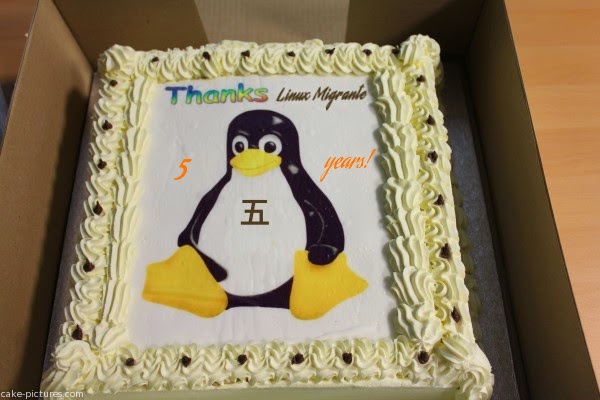 |
| Birthday cake sent by Mandriva Chronicles :) |
This humble blog was born on May 21st, 2010. Little I knew back then that I'd carry on for writing about my Linux-related experiences for five years. I wasn't even sure I'd keep using Linux for so much time. During those I double booted Windows XP, which was my main OS, and used Linux (MEPIS 8.0) as a "just in case" system.
But the situation changed.
Soon enough, I found myself booting Linux more often, but went to XP whenever I needed to print documents for my Canon printer did not work on MEPIS.
Then, I learned how to make my printer work on Linux.
That changed everything. I had no reason to boot XP and its partition has become a digital storeroom.
What has changed since then?
1- I learned to multi-boot different distros. Although I still use MEPIS 8 on my desktop, I have a ZaReason laptop that boots MEPIS 12, Pardus, Pisi, MiniNo, PicarOS, antiX, and MX Linux.
2- I replaced my Toshiba NB-100 netbook with a Chromebook. It's not the most powerful in the market, but with Crouton and Ubuntu it does beat my netbook, whose hardware is progressively reaching the end of its functional life.
3- I dropped my "Linux should be more like Windows" mentality. It actually amuses me a lot to see that now it is Windows the one that is looking more and more like Linux (except in terms of security and freedom, of course).
4- I became a terminal guru.
Wait, that's not true. My knowledge of the terminal is pretty much the same of those times. People who claim that for using Linux you need to know a lot about the terminal (because you will be using it everyday) are simply delusional.
Five years have passed. Five years of many experiences with Linux...most of them pleasant. Meanwhile, I hear the woes and worries of those around me who still use Microsoft's OSes and are subject to the atrocities of that company.
So far, it has been a great ride, Tux!
miércoles, 26 de septiembre de 2012
Advantages of Multi Booting

I've been experimenting with several utilities on my little Netbook Toshiba NB-100. Concretely, I plan to use them for educational purposes, once I give them a twist (they have not been planned initially as educational tools!) Yesterday, while I was fiddling with Platinum Arts Sandbox, I must have pressed a weird key combination. This caused the speaker output of my MEPIS 11 system to go mute. Of course, I didn't realize because I usually turn down the computer's master volume to work in my office.
Later, I went to my class. Since I wanted to show a movie to my students, I turned the master volume up...It was then that I noticed I had a very silent MEPIS system!
I didn't have much time left before my class...maybe it was three minutes before it started. Most of my students were there already and I had all the equipment set.
I checked Alsamixer in a hurry and apparently everything was fine (I did not get as far as to check the speaker control). I had no time to investigate...
What did I do?
I rebooted my netbook using Pardus this time. Pardus played the movie without any issue and nobody knew about my previous agony.
After my class, I booted MEPIS again and, since I was not under stress any longer, I quickly found the culprit: that muted speaker! It was solved with a simple click.
This situation made me think about the eternal discussion around multi boot computers and virtual machines, usually fueled by notions of fragmentation vs. wholeness. Many people think "Why bothering with a dual-boot computer? Install the other system as a guest in a virtual machine!"
Now...if I had done that, it wouldn't have helped me much because the output of the virtual sound depends on the sound output of the host system. I would have ended with two beautiful, but silent systems! And what if the host system fails altogether? What good is the virtual system then?
In conclusion, multi boot systems, although fragmented, do have their advantages over those that are hegemonic. Too bad then that Windows 8 will make multi-booting systems more difficult to set up.
domingo, 17 de julio de 2011
Learning to Slack with Kongoni!
Some days ago, I had said that I was bored since my multi-boot systems were working perfectly. I also said that I wanted to try Kongoni GNU/Linux.
Since booting the live CD wasn't enough, my quest for knowledge led me to actually installing this Slackware-based distro. Three were my main motivations to add yet another head to my hepta-boot desktop computer:
1. I have not tried a purely Libre distro.
2. I've always wanted to try Slackware, but I feel I'm not yet up to it.
3. I felt it was about time for me to see if I could do well with a text-based installation.
Thus, last night I took up the challenge, encouraged by a rainy night during which sleep had eluded me.
Kongoni's text installation did not bite me. Actually, I could understand quite well most of the questions (I'm not going to get into details here, but they asked about partitions, locales, the clock and such). My only problem was when I reached the part in which the installation asked me about the mounting points for my multiple partitions. Being careless as I am, I had forgotten to take note of that beforehand, so I said "What the heck! Let's live life dangerously!" and chose "ignore" for all the mounting points. After all, being Slackware an OS that encourages people to build their own systems, it must have some way to mount those things later, whatever they were! :P
After some time of file-copying, Kongoni's installer gave me good news: My system had been installed successfully! (I couldn't help feeling proud of myself because that meant that I could actually install a GNU/Linux distro without the help of any GUI).
Next was rebooting to meet my brand new Kongoni OS! Yay!
Kongoni's Grub greeted me with many (and I mean it) entries to boot. It seemed that all my previous Grub entries (functional or not) came to a dance and waited for me to pick them. Incredibly enough, my tortured brain was able to remember vaguely which OS was on which partition...and there were many in that Grub that simply didn't correspond to my OSs.
I let them alone and picked Kongoni, of course. I braced myself for chaos and despair, but in a matter of seconds I was happily navigating Kongoni's KDE desktop.
Again, although there were some desktop effects, I couldn't get the cube to work. Oh well, being a humble Mepis 8 user with no Compiz, I can live without it, hehehe!
The second test: music and video. They had not worked during my live session. Did they work now?
No. Amarok and Dragon Player worked, but very silently. That's bad if you actually want them to give you some sound, right? Moreover, Dragon Player crashed again...

While I'm aware that such problem can be corrected somehow, I'm just beginning my Kongoni-Slacking experience, so I opted for an easier approach. How about installing VLC?
How does Kongoni manage the packages? Oh, I had to meet PIG and got familiar with the concept of "ports".

Apparently, PIG took something and compiled it along with its libraries and dependencies. I didn't understand much what was happening, but hope to learn more in time. It showed me the whole process...I wish I knew what all that meant! Whatever PIG did, it did it well because after waiting for some time, I could find VLC in the application launcher:

So, did I get sound this time? Yes! Perfect! I tried different kinds of videos and audio files from my different partitions (no problem accessing them, by the way) and VLC played all.

The downsides of this experience? First, when trying the Grub options, I made a mistake with Mandriva (which had previously stood several of my destructive attacks and was a bit unstable) and rendered it unusable. Even though it tried to repair itself later, it didn't work out this time.
Also, since I didn't like that Grub, I used Mepis System Assistant to repair it and later I manually edited the file "menu.lst" to enable Pardus, that was absent.
Now I have to reinstall my Mandriva system...but I guess I'll wait for the brand new Mandriva to arrive. Meanwhile, I'll be trying to learn more about Kongoni and will start my slacking!
Since booting the live CD wasn't enough, my quest for knowledge led me to actually installing this Slackware-based distro. Three were my main motivations to add yet another head to my hepta-boot desktop computer:
1. I have not tried a purely Libre distro.
2. I've always wanted to try Slackware, but I feel I'm not yet up to it.
3. I felt it was about time for me to see if I could do well with a text-based installation.
Thus, last night I took up the challenge, encouraged by a rainy night during which sleep had eluded me.
Kongoni's text installation did not bite me. Actually, I could understand quite well most of the questions (I'm not going to get into details here, but they asked about partitions, locales, the clock and such). My only problem was when I reached the part in which the installation asked me about the mounting points for my multiple partitions. Being careless as I am, I had forgotten to take note of that beforehand, so I said "What the heck! Let's live life dangerously!" and chose "ignore" for all the mounting points. After all, being Slackware an OS that encourages people to build their own systems, it must have some way to mount those things later, whatever they were! :P
After some time of file-copying, Kongoni's installer gave me good news: My system had been installed successfully! (I couldn't help feeling proud of myself because that meant that I could actually install a GNU/Linux distro without the help of any GUI).
Next was rebooting to meet my brand new Kongoni OS! Yay!
Kongoni's Grub greeted me with many (and I mean it) entries to boot. It seemed that all my previous Grub entries (functional or not) came to a dance and waited for me to pick them. Incredibly enough, my tortured brain was able to remember vaguely which OS was on which partition...and there were many in that Grub that simply didn't correspond to my OSs.
I let them alone and picked Kongoni, of course. I braced myself for chaos and despair, but in a matter of seconds I was happily navigating Kongoni's KDE desktop.
Again, although there were some desktop effects, I couldn't get the cube to work. Oh well, being a humble Mepis 8 user with no Compiz, I can live without it, hehehe!
The second test: music and video. They had not worked during my live session. Did they work now?
No. Amarok and Dragon Player worked, but very silently. That's bad if you actually want them to give you some sound, right? Moreover, Dragon Player crashed again...

While I'm aware that such problem can be corrected somehow, I'm just beginning my Kongoni-Slacking experience, so I opted for an easier approach. How about installing VLC?
How does Kongoni manage the packages? Oh, I had to meet PIG and got familiar with the concept of "ports".

Apparently, PIG took something and compiled it along with its libraries and dependencies. I didn't understand much what was happening, but hope to learn more in time. It showed me the whole process...I wish I knew what all that meant! Whatever PIG did, it did it well because after waiting for some time, I could find VLC in the application launcher:

So, did I get sound this time? Yes! Perfect! I tried different kinds of videos and audio files from my different partitions (no problem accessing them, by the way) and VLC played all.

The downsides of this experience? First, when trying the Grub options, I made a mistake with Mandriva (which had previously stood several of my destructive attacks and was a bit unstable) and rendered it unusable. Even though it tried to repair itself later, it didn't work out this time.
Also, since I didn't like that Grub, I used Mepis System Assistant to repair it and later I manually edited the file "menu.lst" to enable Pardus, that was absent.
Now I have to reinstall my Mandriva system...but I guess I'll wait for the brand new Mandriva to arrive. Meanwhile, I'll be trying to learn more about Kongoni and will start my slacking!
domingo, 10 de julio de 2011
Everything's Fine...Shall I Try an Update?
While several of my colleagues and students are having a great time fighting viruses and malware or trying to get their mainstream, highly-reputed systems to work again, both my mutant penta-boot netbook and my grotesque hepta-boot desktop have been working fine. Thus, more out of boredom than for any other reason, I decided to check for and install their corresponding updates. Since it had been a few months since my last update, I thought things could get complicated and thus I could join my colleagues' frustration...let's see:
A- My penta-boot netbook:
1. Mepis 8.0 (main OS): it is up to date.
2. Mepis 11: 17 packages needed to be updated...nothing bad happened after the update.
3. Mandriva One 2010 Spring: 5 packages needed to be updated...no issues after installing them.
4. Pardus 2010: Up to date.
5. Windows XP: I don't boot it anymore, so no need to update it.
B- My hepta-boot desktop:
1. Mepis 8.0 (main OS): it is up to date.
2. Mepis 11: 17 packages needed to be updated...everything went smoothly with the updates.
3. Mandriva One 2010 Spring: 5 packages needed to be updated...no problems after the installation.
4. Pardus 2010: Up to date.
5. AntiX m11: Up to date.
6. MiniNo: Up to date.
7. Windows XP: Same as with my netbook.
OK, no luck! My multi-headed computers are updated and running normally...hehe! That didn't help me with my boredom but it's much better to be bored this way!
A- My penta-boot netbook:
1. Mepis 8.0 (main OS): it is up to date.
2. Mepis 11: 17 packages needed to be updated...nothing bad happened after the update.
3. Mandriva One 2010 Spring: 5 packages needed to be updated...no issues after installing them.
4. Pardus 2010: Up to date.
5. Windows XP: I don't boot it anymore, so no need to update it.
B- My hepta-boot desktop:
1. Mepis 8.0 (main OS): it is up to date.
2. Mepis 11: 17 packages needed to be updated...everything went smoothly with the updates.
3. Mandriva One 2010 Spring: 5 packages needed to be updated...no problems after the installation.
4. Pardus 2010: Up to date.
5. AntiX m11: Up to date.
6. MiniNo: Up to date.
7. Windows XP: Same as with my netbook.
OK, no luck! My multi-headed computers are updated and running normally...hehe! That didn't help me with my boredom but it's much better to be bored this way!
miércoles, 26 de enero de 2011
My Triple-boot Netbook...No More

In July last year, I wrote about my little netbook Toshiba NB-100. Even though it originally came with Windows XP preinstalled, I forced Redmond's OS to make room for SimplyMepis 8.0. That's how my dual-boot computer was born.
Sometime later, encouraged by the stability of Mepis and the flexibility of Linux, I went for a bolder move and installed Mepis 8.5 as well. I then had a triple-boot computer!! Oh, I was so proud of it!
Back in those days, I was happy to experiment with Linux. In fact, I seldom booted XP. Little by Little, XP moved away from the center and became more like a storeroom on my netbook. I didn't wipe that system out because of nostalgic reasons. Besides, the thought "if something goes wrong with Linux, you can boot Windows" was still present in my mind.
Bullseye! At least in part. Something went wrong with Linux! This was something that both Mepis 8.0 and Mepis 8.5 brought about...
My hard drive broke. But it didn't break down...it broke itself apart!
Let me clarify. My hard drive split into a new partition and Mandriva Linux took over it. It was interesting because Mandriva handles things a bit differently. Thanks to Linux, my tiny netbook became a four-headed monster!!
As if that weren't bad enough, the process repeated itself a couple of weeks ago. My neetbook grew one more head and this time it was called Pardus 2011 RC!
A very sensible question: Why do I have so many systems on my resource-limited netbook?
The answer is very simple: Because I have the freedom to do it. I am not tied to what OEMs want to give me. I am a free person and I want to experience technology freedom as well.
Second question: Do I use all those Linux systems? You bet! My favorite is Mepis 8.0, but I regularly boot Mandriva, and I used Pardus in class just today. Oh, Mepis 8.5 was the one in charge of my dissertation for my education degree. The only one I don't use is XP. Windows XP is still there, but I hadn't used it in ages. I don't need to. However, as far as I don't need its space, I think it will stay.
I didn't see this problem come. I never expected Linux to be so addictive...I had no idea that in a year it would encourage me to experiment and do things that all my previous Windows training didn't teach me.
My netbook is not a triple-boot computer anymore. Nowadays, it is a five-headed monster and I am so proud of it because it makes me feel free. I am still an amateur, but I feel I have taken customization to a level I had never imagined possible! Besides, my netbook works perfectly: four of its heads are always ready for work although one of them (its original one) is asleep...maybe forever.
Suscribirse a:
Entradas (Atom)